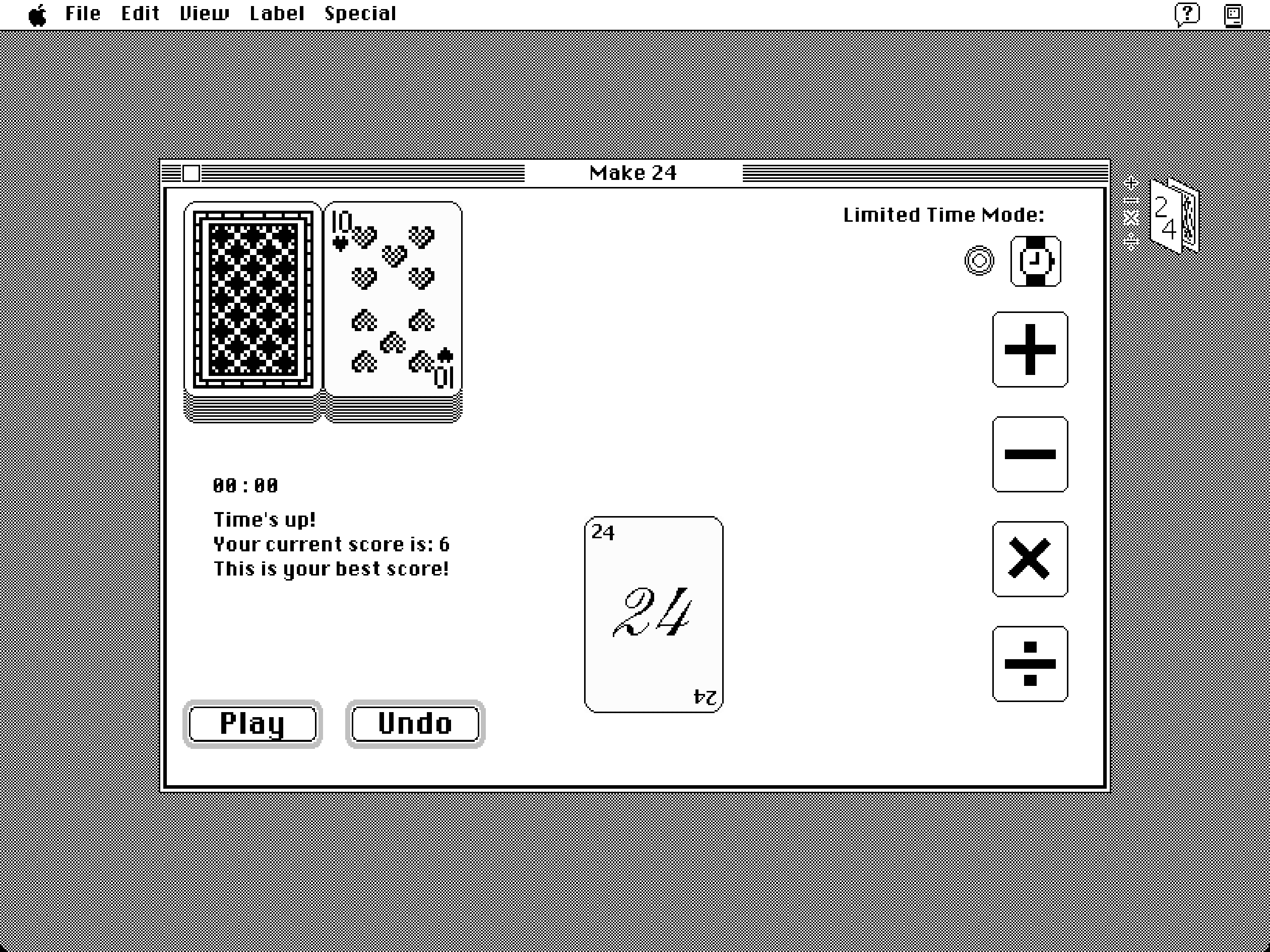
Make 24 is a digital version of the classic card game: given four cards, use addition, subtraction, multiplication, and division to reach exactly 24. It runs on a Macintosh System 7-inspired desktop, with draggable windows, two play modes, and a high score tracker.
Quick question: how would you use three 5s and one 1 to make 24?
… I still remember those moments in primary school, lying in bed with my parents on Sunday mornings, the three of us, as they challenged me with this question.
1 Origin
I spent lot of time playing this game with my dad and friends during my childhood. We’d casually grab a deck of cards to start the game, where J, Q, and K count as 11, 12, and 13. We always liked to compete to see who could calculate faster, or who could come up with more solutions to a problem. But I had never played it as a video game.
However, the real starting point of this project (and my game development journey) wasn’t Make 24. I’d been thinking about building a retro desktop mystery game — the kind where you explore folders and files to piece together some hidden answer — after playing video games like Hypnospace Outlaw. If you open the Make24 game now, the title on the start menu still reads “The Forgotten Files.”
If I ever find the time, the original idea might still happen, as the desktop is already there… If I ever have the time!
But before attempting something that ambitious, I wanted to get comfortable with game development first. Make 24 felt like the right scope: a game I knew well from childhood, with clear rules, and just enough complexity to be interesting to build.
2 Why Godot
I used Godot to create my game. Before that, I tried Unity and Unreal briefly, but they felt like too much infrastructure for a small and simple 2D game. Godot is free, open-source, and its design philosophy maps cleanly onto how I think about structure: a game is a tree of nodes grouped into scenes. I watched Brackeys’ Godot Beginner Tutorial to get my bearings, and wrote everything else myself from scratch, without AI assistance.
This project was also my first real encounter with object-oriented programming as something that made sense. Simulating a deck of cards forced me to think in objects: a card has a suit and a number; the deck can shuffle, deal, and track what’s been played; the table has state that updates when a card is picked up or put down.
3 DevLog and Challenges
3.1 Window Management
One might be surprised to know that the biggest technical challenge had nothing to do with card logic. Before simulating the card game itself, I first needed to create the draggable, closable windows as part of the desktop environment. My first attempt used Godot’s built-in Window node (because of the name!), which handles a lot automatically — maybe too automatically. It didn’t behave like a window living inside the game world; it sat above it, outside the scene tree’s normal flow, and couldn’t be layered or styled the way I needed.
I ended up abandoning Window entirely and built a custom implementation using CharacterBody2D with a CollisionShape2D and a drag area. This gave me full control over positioning, z-ordering, and close behaviour. Once a window is closed, it emits a signal to its parent scene, which removes it cleanly.
It took much longer than I expected, but the experience clarified something about game development that isn’t obvious from the outside: a large portion of the work is essentially visual problem-solving. Getting something to look like it behaves correctly is often as hard as making it behave correctly, and sometimes they’re the same problem.
3.2 Fractions
Make 24 involves division, and division in card games occasionally produces non-integers. Storing intermediate values as floats creates a subtle problem: floating-point rounding means that a result which should be 24 might come out as 23.999… and fail the check.
The fix was to represent every value as a fraction throughout the calculation — numerator and denominator as separate integers, reduced at each step. This also affected how values are displayed on the cards, which now shows fractions rather than decimals when appropriate. It’s more accurate and, honestly, closer to how you’d actually calculate in your head.
3.3 Limited Time Mode
Initially, the game only provided a normal mode where you solve at your own pace. However, I remembered that the competitive version I played as a kid, racing to shout the answer first, which had a completely different vibe. So I added the limited time mode, where you have two minutes to solve as many hands as possible, it saves your best score, and compares it against your current run when the timer runs out. If you spend too long hesitating on a problem, just redraw!
3.4 Graphical and SFX Design
The Macintosh System 7-inspired desktop isn’t just decoration — it’s the frame that makes a maths puzzle feel like you’ve found a forgotten game on an old computer. The desktop patterns are adapted from classic Macintosh assets; the card faces were sourced from itch.io and edited in Aseprite. Some of the icons and window graphics I drew myself in Aseprite from scratch. Fonts, button styles, and layout are all handled through Godot’s theme system, which lets you define the visual language once and apply it consistently across scenes.
yes, Praat, that phonetic analysis app.
Additionally, the deal card sound effects and pause menu sound effects are downloaded from royalty free music websites and edited by me using Praat.
4 My Takeaways
Looking back, most of what I learned from this project came from the points where the obvious approach didn’t work.
The window drag, for instance, ended up being four lines of logic: record the mouse offset on click, update position each physics frame, and track whether the mouse is inside the node. But getting there wasn’t as simple.
func _input(event):
    if event is InputEventMouseButton:
        if event.is_pressed() && mouse_in:
            dragging = true
            offset = get_local_mouse_position()
        elif not event.is_pressed():
            dragging = false

func _physics_process(delta):
    if dragging:
        position = get_global_mouse_position() - offset
The fraction system followed the same pattern. Every intermediate value is stored as [numerator, denominator], reduced at each step with a GCD function, and only displayed as a fraction when the denominator isn’t 1 — so the card shows 7 when it’s 7/1, and 7/2 when it isn’t. The logic is quite simple, but the decision to do it this way, rather than reach for floats and hope the rounding worked out, took a while to arrive at.
Looking back, I’m really glad I set a reasonable scope from the beginning. I started this project wanting to build something more ambitious — the desktop mystery game is still somewhere in the back of my mind. Make 24 was supposed to be the warmup. It turned out to be the part where I actually learned how to think about building things.
Thank you for exploring my project! I hope you enjoy playing Make 24 as much as I enjoyed creating it.